Device Setup
This guide explains how to install the software used at CodeWarriors Code Camps. Once installed, your child will be able to continue working on the projects they started during camp and build their own games at home.
Godot#
Important: Install the standard version of Godot. Do not install the .NET (Mono) version, as we do not use it at CodeWarriors camps.

Installation on Windows:
- Download the latest stable version from the official Godot website. For Windows: https://godotengine.org/download/windows/
- The download will be a ZIP file. click the file and select “Extract All”.
- Open the extracted folder and double-click the Godot.exe to launch Godot.
- (Optional) Move this exe to a new and more permanent folder, such as C:/Dev or C:/Godot

Installation on Mac:
- Download the latest stable version from the official Godot website. For Mac: https://godotengine.org/download/macos/
- The download will be a ZIP folder. Double click to extract it.
- Open the extracted folder and double-click the Godot app icon to launch Godot.
- (Optional) Move this application to the Applications folder.

Installation on Raspberry Pi:
- Download the latest stable version from the official Godot website. For a Raspberry Pi running the standard Raspberry Pi OS (previously Raspbian), download Linux - arm64: https://godotengine.org/download/linux/
- The download will be a compressed file. Extract it.
- Move the extracted file to
/usr/local/bin/and name it simplyGodot - You can do this using the following commands:
sudo mv Godot*-stable_linux.arm64 /usr/local/bin/godot
sudo chmod +x /usr/local/bin/godot
Opening an existing Godot project#
If you’ve downloaded one of your CodeWarriors camp projects:
- Download the ZIP file from the link in your Next-Steps email.
- Extract (unzip) the ZIP file to a convenient location on your computer.
- Open Godot.
- Click Import (button near top-right of window).
- Browse to the extracted project folder.
- Select the project.godot file, and click Open.
- Click Import.
Your project will now appear in the Godot Project Manager, and you can open it at any time by double-clicking it.
Tip: You only need to import a project once. After that, Godot remembers it in your project list.
Python#
Installation on Windows:
- Download latest Python 3 Install Manager from the official Python Download page: https://www.python.org/downloads/windows/
- Run the installer.
- During install, set
Add Python to PATH(Important) - During install, set
Use admin privileges - Verify install success by opening a
cmdprompt and typingpython --version
Installation on Mac:
- Download latest Python 3 release from the official Python Download page: https://www.python.org/downloads/macos/
- Run the Installer.
- Verify install success by opening a
terminalwindow and typingpython3 --version
Installation on Raspberry Pi:
- Python 3 is pre-installed on Raspberry Pis running Raspberry Pi OS. Verify this by opening a terminal and typing
python3 --version
Visual Studio Code#
Installation on Windows:
- Download the VSCode Windows installer from the VSCode Downloads page: https://code.visualstudio.com/download
- Run the Installer.
- Accept the default installation options.
- Open Visual Studio Code to ensure the installation was successful.
Installation on Mac:
- Download the VSCode MacOS installer from the VSCode Downloads page: https://code.visualstudio.com/download
- Run the Installer.
- Open Visual Studio Code to ensure the installation was successful.
Installation on Raspberry Pi:
- Open a terminal / bash prompt.
- Run
sudo apt update - Run
sudo apt install code - Press Y when prompted.
- Test Visual Studio Code by opening it from the “Programming” menu.
Visual Studio Code Python Extension#
all platforms:#
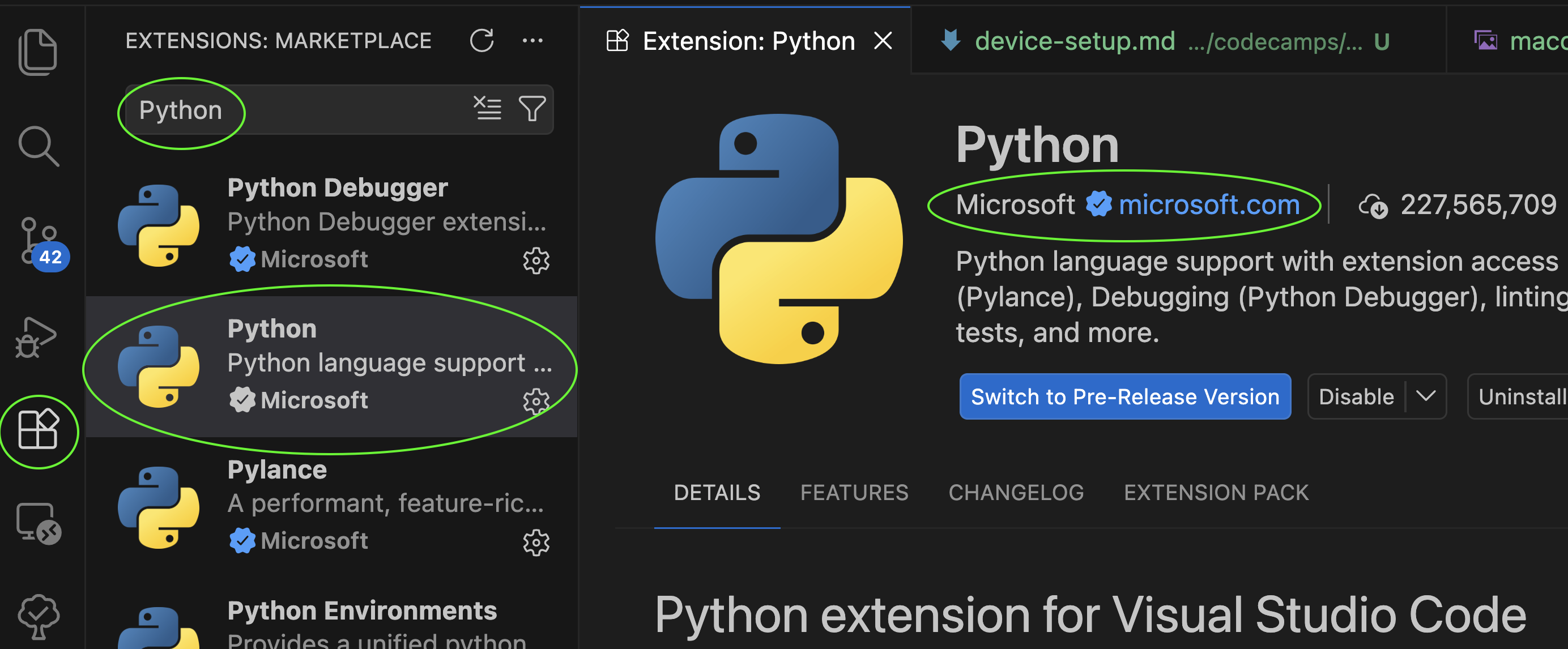
- In Visual Studio Code, open extensions
- Install
Python- popular Python Language Support extension by Microsoft
(Only required for 3, 4, or 5-day camps)
Audacity#
Installation on Windows:
- Download the current Audacity installer for Windows: https://www.audacityteam.org/download/windows/
- Run Install.
Installation on Mac:
- Download the current stable Audacity installer for Mac: https://www.audacityteam.org/download/mac/
- Run Install.
Installation on Raspberry Pi:
- Download the current stable Godot installer for Linux: https://www.audacityteam.org/download/linux/
(Only required for students attending intermediate and advanced camps)
GIT#
Installation on Windows:
- Download the current git “maintained build” from the “Click here to download” link on: https://git-scm.com/install/windows
- Run the Setup.
- Initial git config:
- Run
git config --global user.name "{your name}" - Run
git config --global user.email "{your.email@example.com}"
- Run
Installation on Mac:
- Open a
terminalwindow - If you haven’t installed homebrew already, install it:
- Run the command to install Homebrew, listed on this page: https://brew.sh/
- Run
brew install git - Initial git config:
- Run
git config --global user.name "{your name}" - Run
git config --global user.email "{your.email@example.com}"
- Run
Installation on Raspberry Pi:
- git is probably already installed on your Raspberry Pi. Confirm this by opening a terminal and running:
git --version - If git is not installed, then do the steps below:
- Run
sudo apt update - Run
sudo apt install git
- Run
- Verify install success by opening a terminal window and typing
git --version - Initial git config:
- Run
git config --global user.name "{your name}" - Run
git config --global user.email "{your.email@example.com}"
- Run
Finished?#
If you’ve successfully installed Godot, Python and Visual Studio Code, you’re ready to continue building games at home!
You may like to explore the CodeWarriors Patterns library for ideas on what to build next.