
CWG-001 Enemy Follows Player
Difficulty: ⭐ Beginner
Platform: Godot 4.7
👷🏽♀️ What you’ll build#
This pattern makes an enemy automatically move towards the player.
It works well for simple games where an enemy should chase the player around the level. The enemy does not need to know anything about your player scene, and you do not need to change your player script. Even if you have many enemy instances, they will all target the player.
📢 Before you start#
This pattern assumes:
- You have started building a Godot 2D game, and you have already created a player which you can control.
- Your player is a
CharacterBody2D. - You have created an enemy character.
- Your enemy is a
CharacterBody2D. - Other enemies also use this script or are at least added to the
"enemy"group. - There is only one player in your game.
🌱 Scene Tree#
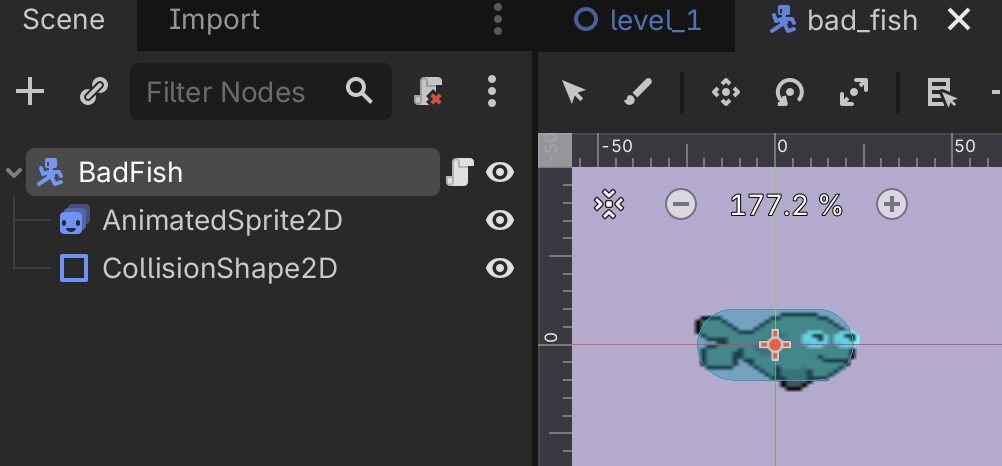
Your enemy scene should look something like this:
Enemy (CharacterBody2D)
├── Sprite2D or AnimatedSprite2D
└── CollisionShape2D
Here’s what mine looks like:
📜 Enemy Script#
Attach the script to the root CharacterBody2D of your enemy scene, then replace the script contents with the code below.
extends CharacterBody2D

# How quickly the enemy moves toward the player.
@export var speed := 80.0

# Set this to true if the enemy should fall under gravity.
# Set this to false for flying or swimming enemies.
@export var use_gravity := true

# Adjust this to make gravity stronger or weaker.
@export var gravity := 500.0

# Stores the CharacterBody2D that the script identifies as the player.
var player: CharacterBody2D


func _enter_tree() -> void:
	# Mark this character as an enemy.
	add_to_group("enemy")

func _ready() -> void:
	# Try to locate the player.
	player = find_player(get_tree().current_scene)


func _physics_process(delta: float) -> void:
	# If the player no longer exists, search again.
	if not is_instance_valid(player):
		player = find_player(get_tree().current_scene)

	# Stop if no player could be found.
	if player == null:
		velocity = Vector2.ZERO
		return

	# Work out the direction towards the player.
	var direction := global_position.direction_to(player.global_position)

	if use_gravity:
		velocity.x = direction.x * speed
		if not is_on_floor():
			velocity.y += gravity * delta
	else:
		velocity = direction * speed

	move_and_slide()


func find_player(node: Node) -> CharacterBody2D:
	# Assume the first CharacterBody2D that is not an enemy is the player.
	if node is CharacterBody2D and not node.is_in_group("enemy"):
		return node as CharacterBody2D

	for child in node.get_children():
		var found_player := find_player(child)
		if found_player != null:
			return found_player

	return null
💡 How it works#
When the enemy starts, it searches the current level for a CharacterBody2D that is not in the "enemy" group.
Each frame it:
- Finds the direction to the player.
- Sets its velocity towards the player.
- Calls
move_and_slide()to move while colliding correctly with walls and obstacles.
🧪 Things to try#
Once your enemy is chasing the player, you may like to experiment with these ideas:
- Add (instantiate) multiple enemy instances, and see that they all head towards the player.
- Increase or decrease the
speed. - Use a different sprite or animation.
- Rotate the enemy so it faces the player.
- Stop chasing when the player is too far away.
- Add a health system so touching the enemy hurts the player.
🐞 Common problems#
The enemy doesn’t move#
- Is the enemy a
CharacterBody2D? - Is the script attached to the enemy?
- Does your level contain a player that is also a
CharacterBody2D?
The enemy walks through walls#
Make sure your enemy has:
- a
CollisionShape2D move_and_slide()in_physics_process()- collision layers and masks configured correctly
The enemy chases another enemy#
This pattern assumes every enemy using this script adds itself to the "enemy" group. If you have other moving characters that are not the player, you may need a more advanced way to identify the player.
🙋 Need help?
Every programmer gets stuck sometimes — even professional game developers!
1. Experiment
Try changing something, then run your game again. Small changes are a great way to learn.
print a variable to Godot's Output panel, using print(variablename)
2. Ask someone nearby
Ask a friend, the person next to you, or a parent. Sometimes simply explaining the problem helps you solve it!
3. Ask AI or search online
Tools like ChatGPT and Google can often help. Be specific, include any error messages, and paste your code if you can.
4. Ask the CodeWarriors team
Email questions@laudwords.com
If possible, include:
- what you're trying to build
- what isn't working
- your code
- any error messages
- a screenshot of your game